Architecture
This page describes LabLink's architecture, components, and how they interact.
System Overview
Two repositories feed a deployment. This repo (talmolab/lablink) publishes the
Python packages to PyPI and the Docker images to ghcr.io;
talmolab/lablink-template
holds the allocator's OpenTofu configs, released as tagged bundles. The
lablink CLI downloads a pinned template release and runs OpenTofu itself —
alternatively, admins can fork the template repo and deploy through its GitHub
Actions workflows. See LabLink CLI for how the paths compare,
CLI First Deployment and
Template Repo Deployment for the steps.
A deployed LabLink on AWS. Admins and students reach the allocator by its Elastic IP or, optionally, a Route 53 name; the allocator instance runs Flask, PostgreSQL, the provisioner and nginx in one container, provisions client instances, and relays each participant's remote-desktop connection to the KasmVNC server on their assigned client.
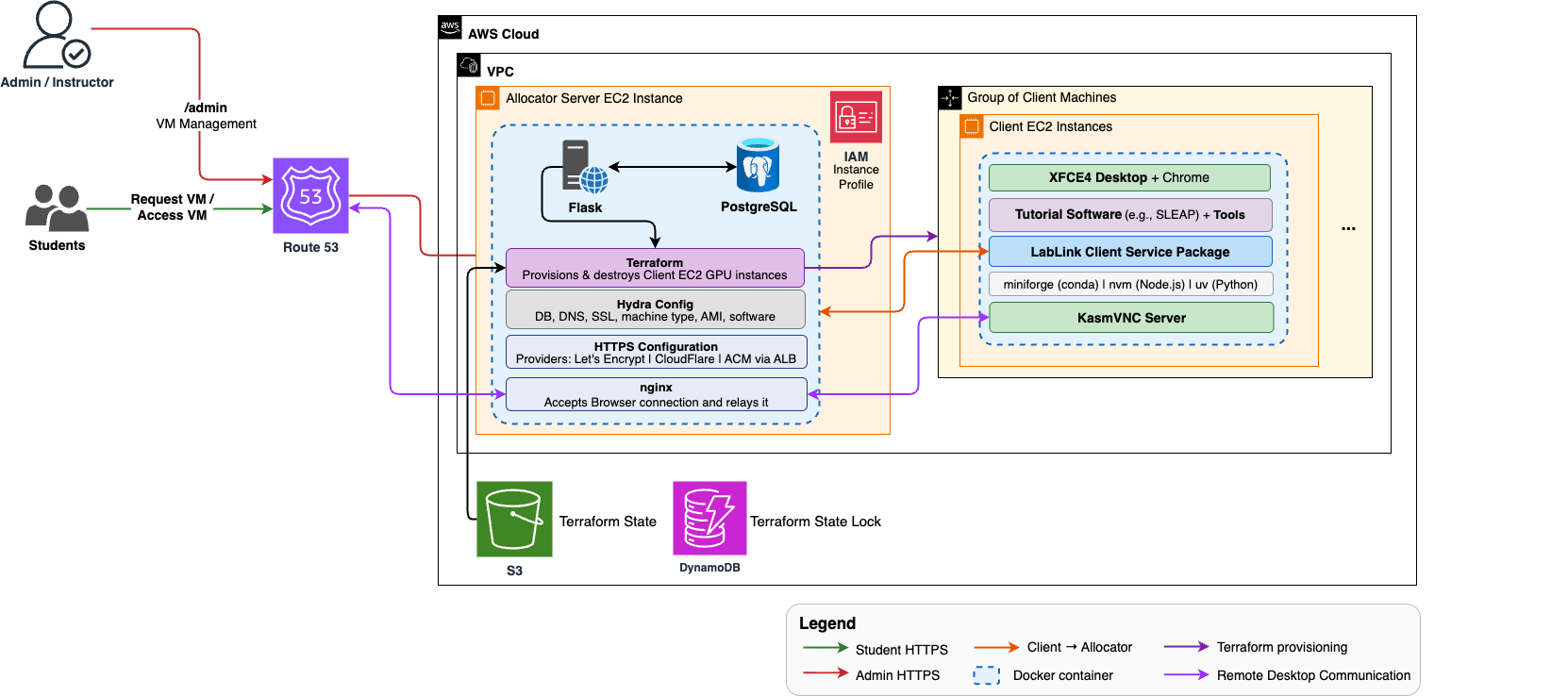
Inside the allocator container, nginx on port 5000 is the only network-facing
process: Flask binds loopback (127.0.0.1:8000) and PostgreSQL runs co-located
in the same container. Participants' noVNC traffic is proxied by that nginx to
the client's KasmVNC WebSocket — the browser never talks to a client VM
directly, except under manual.connectivity=lan_direct, where it opens a
WebSocket straight to the client's LAN IP (see
Client connectivity).
When ssl.provider=letsencrypt (the default) or cloudflare, a
Caddy reverse proxy on the EC2 host terminates TLS on ports 80/443 and
forwards to the container's port 5000.
Depending on configuration, extra processes join the stack: a wstunnel
server inside the container (manual.connectivity=reverse_tunnel), a
cloudflared connector inside the container
(manual.participant_exposure=cloudflare_tunnel), and a Tailscale sidecar
container (manual.connectivity=mesh_overlay).
Providers and Connectivity
Two axes decide how a LabLink deployment is shaped. Both are resolved once at
startup, in providers/registry.py, and the rest of the codebase talks to the
resulting objects rather than branching on provider type.
Compute provider — where client machines come from
Discovered through the lablink.providers entry-point group, so a new backend can be
added without touching core code. Two ship today, aws and manual — see
Two providers for the comparison.
Capability flags, not provider-type checks, gate the behaviour that differs:
can_provision_hosts— false formanual, which is why that deployment surfaces its register token in the container logs for the CLI to pick up, rather than passing it through an OpenTofu output.can_recover_hosts— false formanual, so the auto-reboot loop skips BYO boxes instead of attempting AWS calls against machines it doesn't own.
Client connectivity — how the desktop is reached
Selectable for the manual provider only, as a small closed set —
lan_direct, mesh_overlay, reverse_tunnel. The byte path of each and how
to choose are in
Pick a connectivity mode.
Each strategy implements prepare_browser_session, which is what
/api/request_vm calls to rotate the client's VNC password and persist the
browser_ws_url the viewer page will open — which is why the assignment path has no
connectivity-specific branches in it.
AWS deployments always use the allocator-proxied path and ignore this setting.
See Configuration for the settings and API Endpoints for the registration contract.
Component Details
Allocator Service
Purpose: Central management server for VM allocation and orchestration.
Technology Stack:
- Flask: Web application framework, behind nginx (the container's only network-facing process); Caddy on the host adds automatic HTTPS
- PostgreSQL 17: Relational database for VM state, co-located in the container;
SKIP LOCKEDgives race-free seat claims - psycopg2: Direct SQL through a shared connection pool (see
db/layout inCLAUDE.md); no ORM — SQLAlchemy appears in the dependencies only as APScheduler's job store - APScheduler: Scheduled destruction jobs
- Hydra/OmegaConf: Structured config with typed overrides
- OpenTofu: Infrastructure provisioning
- Docker: Containerization
Key Responsibilities:
-
Web Interface:
- Admin dashboard for VM management
- VM creation interface
- Instance listing and monitoring
-
API Endpoints:
/api/request_vm: Claim a seat for a participant/desktop: Cookie-gated noVNC viewer/api/launch: Provision new VM instances (async operation)/admin/instances: List all instances/admin/allocator-logs: The allocator's own log viewer/api/v1/clients/register: BYO client self-registration/api/heartbeat: Client liveness reporting
See API Endpoints for the full surface.
-
Database Management:
- Tracks VM states (
initializing,running,error,rebooting;unknownis accepted by the status endpoint but nothing writes it) - Claims seats atomically with
FOR UPDATE SKIP LOCKED
- Tracks VM states (
-
Infrastructure Orchestration:
- Spawns and destroys client VMs via OpenTofu, as async operations:
/api/launchand/destroyenqueue a job in theoperationstable, a background worker runstofu apply/destroy, and the admin dashboard polls/api/operationsfor progress. Only one operation runs at a time — enforced by theoperations_single_flightpartial unique index, not by application locking - Manages AWS credentials
- Handles security group configuration
- Spawns and destroys client VMs via OpenTofu, as async operations:
-
Auto-Reboot Service:
- Background thread, 60 s sweep, that picks up VMs with
status=error,Healthy=Unhealthy,initializingfor >25 min,rebootingfor >10 min, orrunningwith no heartbeat for >3 min - Assigned VMs get a warm
sudo reboot(the container survives via its restart policy); unassigned VMs get a colddocker rm -f; cloud-init clean && rebootthat re-provisions from scratch - EC2 stop/start only when SSH fails (always cold)
- 300 s cooldown between attempts; after 3 attempts the VM is set to
errorand its seat released
- Background thread, 60 s sweep, that picks up VMs with
Configuration: See packages/allocator/src/lablink_allocator_service/conf/structured_config.py
Client Service
Purpose: Runs on dynamically created VMs to execute research workloads.
Technology Stack:
- Python: Service implementation
- KasmVNC + noVNC: Browser-only remote desktop, no client install
- Docker: Container runtime
- Custom Software: SLEAP or user-defined
Key Responsibilities:
-
Health Monitoring:
- GPU health checks (every 20 seconds)
- System resource monitoring
- Reports status to allocator
-
Allocator Communication:
- Authenticated with its own per-client secret, issued at registration
- Heartbeat mechanism
- Status updates (in-use, health, startup timings)
- Failure reporting
-
Desktop Session:
- Runs a KasmVNC desktop the participant reaches in a browser
- Exposes a local agent the allocator calls to rotate the VNC password per session
- Clones the configured repository and runs the containerized research software
Desktop performance: the client deliberately overrides seven upstream defaults, because stock KasmVNC and XFCE never reduce cost while the screen is moving. Do not revert these to their defaults without re-measuring:
| Override | Default | Why |
|---|---|---|
xfwm4 use_compositing: false |
on | The compositor recomposites the whole screen on every window move, so Xvnc sees one full-screen damage rect instead of a few small ones. |
-DynamicQualityMin 4 |
7 | The stock 7–8 band is pinned near maximum. KasmVNC varies quality within the band by how fast the screen is changing, not by network feedback, so the floor is what governs motion smoothness. |
-VideoTime 2 |
5 | Sustained motion otherwise spends five seconds in per-rect JPEG/WebP before video mode engages. |
-DetectScrolling 1 |
off | Sends a cheap region shift instead of re-encoding the scrolled region. |
-videoCodec auto |
"" (empty) |
KasmVNC 1.5.0 gates all video streaming on this being non-empty — with the default the server never advertises H.264 and every session silently stays in per-rect JPEG/WebP. auto picks the best probed encoder (NVENC → VAAPI → software x264). |
Xft RGBA: none |
rgb (subpixel) |
Subpixel antialiasing puts coloured fringes on every glyph, and at -DynamicQualityMin 4 those fringes are the first thing the encoder discards — text ends up ringed with colour noise. Greyscale antialiasing compresses better and stays legible at the quality floor. |
Solid backdrop (image-style: 0) |
wallpaper image | The exposed desktop is re-encoded during every window drag. A flat fill costs almost nothing per damage rect where a photograph costs a lot — and it saves the 57 MB ubuntu-wallpapers package. |
Encoder flags go on the Xvnc command line; ~/.vnc/kasmvnc.yaml is still
written but inert, because start.sh bypasses the kasmvncserver wrapper
that reads it. The full rationale — the viewer-preset caveat, the EGL vendor
pinning, the trimmed XFCE package set — lives as comments in
packages/client/start.sh and packages/client/desktop-config.sh.
Configuration: See packages/client/src/lablink_client_service/conf/structured_config.py
Database Schema
Four tables: vms (one row per client machine), operations (async provisioning
work), scheduled_destructions, and settings (deployment-wide key/value state).
The vms row carries the machine's identity and assignment, its provider and
connectivity details, per-session browser state, liveness counters, startup timings,
and — when enabled — session metrics. Full column-by-column reference:
Database.
Triggers: one, maintaining updated_at on scheduled_destructions. Seat
assignment uses FOR UPDATE SKIP LOCKED; see Database.
VM State Machine
The Status column in the vms table follows this lifecycle:
Status |
Written by | Meaning |
|---|---|---|
initializing |
user_data.sh on boot; client start.sh on container start (so also after a warm reboot) |
Booting or starting the client container |
running |
client start.sh, once services are about to launch |
Claimable when UserEmail and AdminReservedAt are NULL and Healthy is not Unhealthy |
error |
user_data.sh / start.sh failure paths; the auto-reboot service when attempts are exhausted |
Out of the pool |
rebooting |
the auto-reboot service | Attempt in flight; reboot_count incremented |
unknown |
nothing | Accepted by /api/vm-status, never written |
Two columns that are not status: UserEmail (assignment) and InUse
(whether the configured software is running, maintained by the client's
update_inuse_status). A participant can hold a seat with InUse = FALSE.
AWS Infrastructure
Security Groups
Allocator Security Group:
- Ports 80/443 (HTTP/HTTPS): Caddy, when an SSL provider is configured
- Port 5000: The container's nginx (direct access for
ssl.provider=none, or from the ALB in the ACM setup) - Port 22 (SSH): Administrative access
PostgreSQL is not exposed: clients report over the HTTP API, not by connecting to the database.
Client Security Group:
- Port 22 (SSH): Administrative access
- Port 6080 (KasmVNC WebSocket) and port 7070 (client agent): Reachable from the allocator, which proxies participant traffic
- Egress: Full internet access for package downloads
Networking
- Elastic IPs: Static IPs for allocators (one per environment)
- VPC: Default VPC or custom (configurable)
- Route 53 (Optional): DNS management for friendly URLs
Storage
-
S3 Buckets: OpenTofu state storage
- Separate state per named deployment (CLI) or per environment (template repo)
- DynamoDB lock table prevents concurrent applies
- Versioning enabled
-
EBS Volumes: Instance root volumes
- Allocator (
t3.large): the template sets noroot_block_device, so the AMI default applies (8 GiB gp3 for stock Ubuntu) - Clients: 80 GiB
- Allocator (
Data Flow
Seat Assignment Flow
VM Creation Flow
A second /api/launch or /destroy while one is in progress is rejected with
the in-flight job's id — the operations_single_flight index makes the second
INSERT fail.
Health Check Flow
Both endpoints authenticate with the per-client secret issued at
registration. GPU health lands in the Healthy column (Healthy,
Unhealthy, N/A) rather than flipping Status directly — the auto-reboot
service decides what to do about an unhealthy VM. A stale heartbeat is not a
state of its own; it simply makes the VM reboot-eligible.
CI/CD Pipeline
See Workflows for detailed CI/CD architecture.
Key Workflows (this repo):
-
CI (
ci.yml): Lints and tests all three packages on pull requests -
Build Images (
lablink-images.yml):- Triggers on PRs, pushes to
main/test, and manual dispatch - Builds allocator and client Docker images
- Pushes to GitHub Container Registry
- Triggers on PRs, pushes to
-
Publish Packages (
publish-pip.yml): Publishes the allocator, client, and CLI packages to PyPI on releases/tags
Infrastructure deployment workflows live in the template repository, not here.
Security Architecture
- TLS: Caddy on the allocator host terminates HTTPS (Let's Encrypt by default); inside the container, nginx is the only network-facing process
- Admin Authentication: HTTP Basic Auth for admin dashboard and management endpoints
- Client Registration & Secrets: Clients (AWS-provisioned and BYO alike) register with a deployment-wide register token, and each is issued its own per-client secret — stored hashed, and presented as a Bearer token on every machine-to-machine endpoint
- Participant Sessions:
/api/request_vmsets a signedlablink_sessioncookie; nginx gates the noVNC WebSocket proxy through Flask viaauth_request(/internal/proxy_auth) - OIDC Authentication: GitHub Actions authenticate to AWS without stored credentials
- SSH Keys: Auto-generated per environment, ephemeral artifacts
- Network: Security groups restrict access by port and source; client desktops are reachable only through the allocator's proxy
See Security for detailed security considerations.